1
Set Up Your Class
Set up your class with defined student accounts (no student PII required).
Theme-based leveling uses student accounts to place each student clearly within one math strand, giving teachers better next steps for the classroom and stronger preparation for college, university, and STEM futures.
Start by setting up student accounts for your class. No student PII is required, so teachers can get started without a heavy setup process.
That simple setup makes it possible to place each student clearly within one math theme now, then check growth later without rebuilding the class each time.


Teachers choose one major math theme, and students complete a short leveling exercise in that strand, usually in about 10 minutes. As students answer each question, the difficulty adjusts to how they are doing.
That gives each student a clearer starting point in the same classroom without forcing everyone into one entry level. Teachers get a practical way to see who is ready for support, grade-level work, or extra challenge.
See the classroom leveling workflow from account setup to using results in daily instruction and checking growth over time.

Set up your class with defined student accounts (no student PII required).

Choose a major math theme to level, based on current classroom focus.

Launch a brief leveling exercise, typically around 10 minutes.

Students answer adaptive questions that increase or decrease in difficulty based on performance.

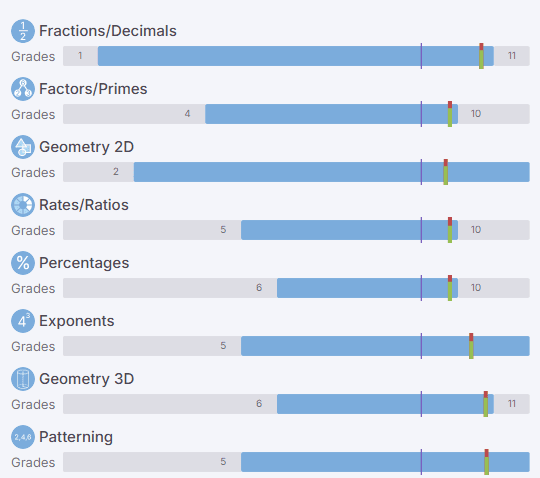
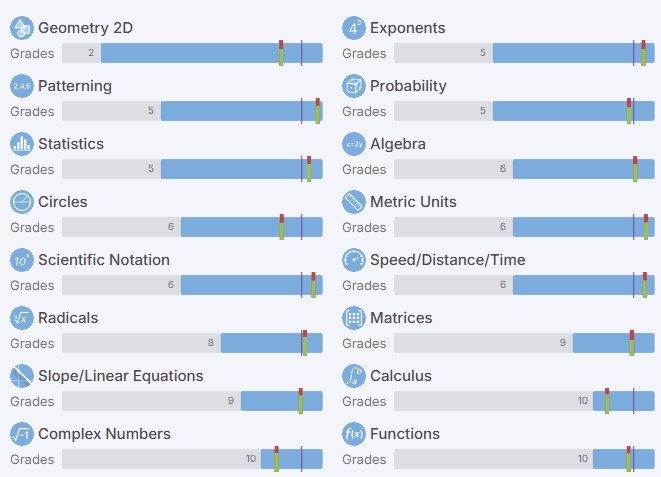
Each student follows a personal path and may level at different grade points within the same theme.

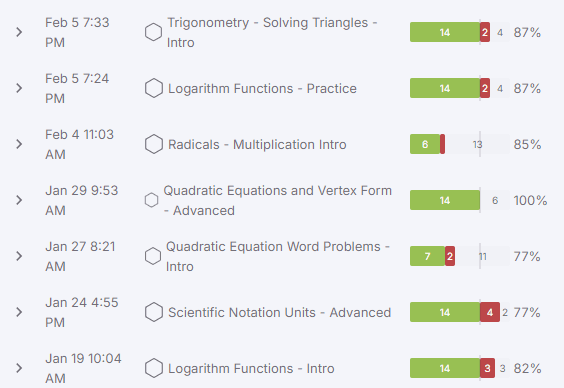
Review class and student-level analysis showing current level, strengths, and challenge areas.

Use results to automatically tailor daily exercises, homework, and challenge work for each learner.
After leveling, teachers can review results for the whole class and for each student in the selected theme.
Instead of one broad score, Mobius shows current level, strengths, and challenge areas in a format teachers can use during planning. That makes it easier to group support, assign grade-level work more wisely, and extend students who are ready for more.
Teachers can level students again later in the same theme to see what has changed over time. Re-leveling makes growth easier to see student by student and across the class.
That fresh evidence can improve instructional decisions about support, regrouping, and added challenge while keeping teacher judgment at the center.
When a class includes students at very different readiness levels, it can be hard to know where each student should begin in the same theme.
Clear placement helps teachers group support, stretch stronger students, and make starting-point decisions with more confidence without treating the whole class as if everyone is in the same place.


Because results stay tied to student accounts, teachers can run leveling again in the same theme without rebuilding the setup each time.
That makes it practical to check growth during a unit or after one ends, then adjust plans based on new results instead of relying only on the first check.
Let's jump on a quick call to see how Mobius helps teachers launch class-based leveling, understand mixed readiness, and turn results into practical next steps for daily instruction.